All series

  • Take gaming to the next level
  • Turntable image 1Turntable image 2Turntable image 3Turntable image 4Turntable image 5Turntable image 6Turntable image 7Turntable image 8Turntable image 9Turntable image 10Turntable image 11Turntable image 12Turntable image 13Turntable image 14Turntable image 15Turntable image 16Turntable image 17Turntable image 18Turntable image 19Turntable image 20Turntable image 21Turntable image 22Turntable image 23Turntable image 24Turntable image 25Turntable image 26Turntable image 27Turntable image 28Turntable image 29Turntable image 30Turntable image 31Turntable image 32Turntable image 33Turntable image 34Turntable image 35Turntable image 36Turntable image 37Turntable image 38Turntable image 39Turntable image 40Turntable image 41Turntable image 42Turntable image 43Turntable image 44Turntable image 45Turntable image 46Turntable image 47Turntable image 48Turntable image 49Turntable image 50Turntable image 51Turntable image 52Turntable image 53Turntable image 54Turntable image 55Turntable image 56Turntable image 57Turntable image 58Turntable image 59Turntable image 60Turntable image 61Turntable image 62Turntable image 63Turntable image 64Turntable image 65Turntable image 66Turntable image 67Turntable image 68Turntable image 69Turntable image 70Turntable image 71Turntable image 72
  • Take gaming to the next level
  • Take gaming to the next level
  • Take gaming to the next level
  • Take gaming to the next level
  • Take gaming to the next level
  • Take gaming to the next level
  • Take gaming to the next level
  • Take gaming to the next level
  • Turntable image 1Turntable image 2Turntable image 3Turntable image 4Turntable image 5Turntable image 6Turntable image 7Turntable image 8Turntable image 9Turntable image 10Turntable image 11Turntable image 12Turntable image 13Turntable image 14Turntable image 15Turntable image 16Turntable image 17Turntable image 18Turntable image 19Turntable image 20Turntable image 21Turntable image 22Turntable image 23Turntable image 24Turntable image 25Turntable image 26Turntable image 27Turntable image 28Turntable image 29Turntable image 30Turntable image 31Turntable image 32Turntable image 33Turntable image 34Turntable image 35Turntable image 36Turntable image 37Turntable image 38Turntable image 39Turntable image 40Turntable image 41Turntable image 42Turntable image 43Turntable image 44Turntable image 45Turntable image 46Turntable image 47Turntable image 48Turntable image 49Turntable image 50Turntable image 51Turntable image 52Turntable image 53Turntable image 54Turntable image 55Turntable image 56Turntable image 57Turntable image 58Turntable image 59Turntable image 60Turntable image 61Turntable image 62Turntable image 63Turntable image 64Turntable image 65Turntable image 66Turntable image 67Turntable image 68Turntable image 69Turntable image 70Turntable image 71Turntable image 72
  • Take gaming to the next level
  • Take gaming to the next level
  • Take gaming to the next level
  • Take gaming to the next level
  • Take gaming to the next level
  • Take gaming to the next level
  • Take gaming to the next level

Evnia Gaming MonitorFull HD gaming monitor

27M1N3200Z/89

Take gaming to the next level
This Philips gaming monitor is an ideal all-around display for intense PC games. Sync technology, rapid 165Hz refresh rate and 1ms response time deliver smooth gameplay. Includes a visually immersive slim-frame display and Ultra Wide-Color.
See all benefits

Take gaming to the next level

  • Evnia 3000

  • 27" (68.5 cm)

  • 1920 x 1080 (Full HD)

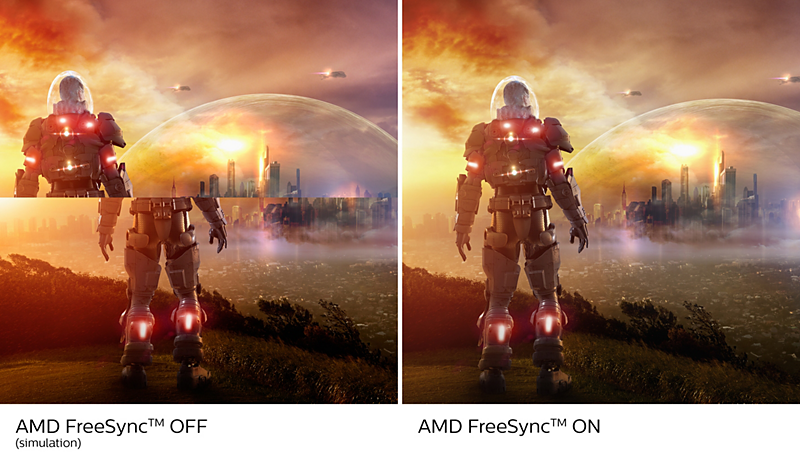
AMD FreeSync™ Premium; tear free, stutter free, fluid gaming

AMD FreeSync™ Premium; tear free, stutter free, fluid gaming

Gaming shouldn't be a choice between choppy gameplay or broken frames. AMD FreeSync™ Premium equips serious gamers with a fluid, tear-free gameplay experience at peak performance. There are no compromises, game confidently with a high refresh rate, low framerate compensation, and low latency.

Certified NVIDIA® G-SYNC® compatible for smooth fast gaming

Certified NVIDIA® G-SYNC® compatible for smooth fast gaming

When playing intense games with high refresh rates, screen tearing may appear without optimal graphics synchronization. This Philips display is certified as NVIDIA® G-SYNC® compatible, reducing screen tearing and syncing your monitor's refresh rate with your graphic card's output for a smoother gaming experience. Scenes appear instantly, objects look sharper, and gameplay is smooth, giving you a stunning visual experience and a serious competitive edge.

165Hz refresh rates for ultra-smooth, brilliant images

165Hz refresh rates for ultra-smooth, brilliant images

You play intense, competitive gaming. You demand display with lag free, ultra-smooth images. This Philips display redraws the screen image up-to 165 times per second, effectively faster than a standard display. A lower frame rate can make enemies appear to jump from spot to spot on the screen, making them difficult targets to hit. With 165Hz frame rate, you get those critical missing images on the screen which shows enemy movement in ultra-smooth motion so you can easily target them. With ultra-low input lag and no screen tearing, this Philips display is your perfect gaming partner

Technical Specifications

Reviews

Sign up to the Philips newsletter for exclusive offers

  • Member-exclusive offers.
  • Early access to sales.
  • News on product launches and tips for healthy lifestyles.

I would like to receive promotional communications – based on my preferences and behaviour – about Philips products, services, events and promotions. I can easily unsubscribe at any time!

  • Member-exclusive offers.
  • Early access to sales.
  • News on product launches and tips for healthy lifestyles.
Disclaimers
  1. "IPS" word mark / trademark and related patents on technologies belong to their respective owners.

  2. The maximum resolution works for either HDMI input or DP input.

  3. For best output performance, please always ensure that your graphic card is capable of achieving the maximum resolution and refresh rate of this Philips display.

  4. Response time value equal to SmartResponse

  5. MPRT is to adjust brightness for blur reduction, so cannot adjust brightness while MPRT is turned on. To reduce motion blur, LED backlight will strobe synchronously with screen refresh, which may cause noticeable brightness change.

  6. MPRT is gaming-optimized mode. Turn on MPRT may cause noticeable screen flickering. It is recommended to turn off when you are not using the gaming function.

  7. NTSC Area based on CIE1976

  8. sRGB Area based on CIE1931

  9. Adobe RGB Coverage based on CIE1976

  10. 2020 Advanced Micro Devices, Inc. All rights reserved. AMD, the AMD Arrow logo, AMD FreeSync™ and combinations thereof are trademarks of Advanced Micro Devices, Inc. Other product names used in this publication are for identification purposes only and may be trademarks of their respective companies.

  11. NVIDIA® G-SYNC® support interface: DisplayPort

  12. Make sure to update NVIDIA® G-SYNC® driver to the latest version, see more information on NVIDIA website: https://www.nvidia.com/

  13. Make sure your graphic card supports NVIDIA® G-SYNC®

  14. The monitor may look different from feature images.